Support that is already there before you call
Calling a technician once everything has stopped is the most expensive way to run IT. A support contract reverses the logic: short response times written into the agreement, maintenance that prevents failures, and a partner who already knows your systems when something needs doing.
The four Xion contract types
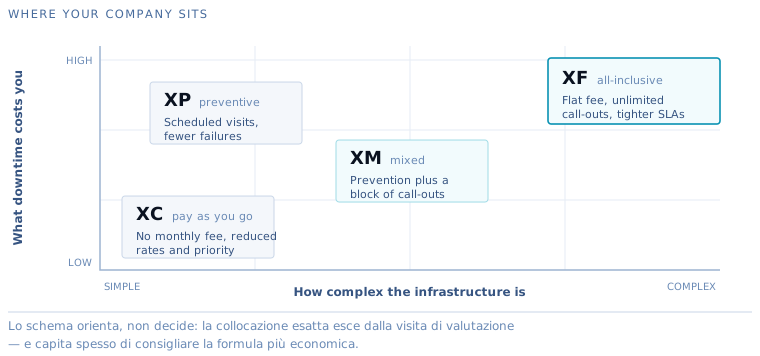
- XC contracts - pay as you go: no monthly fee, reduced rates and priority over one-off requests. For companies with straightforward infrastructure.
- XP contracts - preventive: scheduled maintenance visits that reduce failures before they happen.
- XM contracts - mixed: scheduled maintenance plus a block of call-outs at agreed rates. The balance most small and medium-sized enterprises settle on.
- XF contracts - All-Inclusive: full cover for a flat fee - support, maintenance and unlimited call-outs. Complete peace of mind at a known cost.
How it starts
- Free assessment - a consultant reviews your infrastructure and what your company actually needs.
- A proposal built around that - you receive the level of cover that fits, with clear SLAs and terms.
- Start whenever you want - any month of the year, no constraints, minimum term of twelve months.
One contract, the whole Xion ecosystem
A support contract gives you access to the group’s full range of skills: helpdesk and monitoring, security, networks, remote backup. One number to call, whatever the problem turns out to be.
Which type of contract for which company
- XC (pay as you go) — for very small companies and simple IT: no monthly fee, reduced rates and priority over one-off jobs. Typically the first step for companies getting to know us;
- XP (preventive) — for those who have worked out that prevention costs less: scheduled visits, updates and checks that cut failures sharply;
- XM (mixed) — the one most SMEs choose: the scheduled prevention of XP plus a block of call-outs at agreed rates for the unexpected;
- XF (All-Inclusive) — for companies that would rather stop thinking about IT: everything included for a flat fee, unlimited call-outs, tighter SLAs. In practice, an outsourced IT department.
If you are unsure, that is exactly what the free assessment is for: we look at your infrastructure and tell you honestly which type makes sense — quite often the cheaper one.
Service levels, item by item
SLA is an acronym that appears in almost every proposal and that almost nobody explains. It comes down to four numbers, and they are the part of the contract that really determines what the relationship will feel like.
Time to pick up the case. How long between reporting a problem and speaking to an actual technician — not the automatic reply from the ticketing system, which is only a receipt. This is the figure that decides whether you feel looked after, and it should be measured in minutes.
Remote support response time. In the large majority of cases the problem is solved remotely, so this is the number that matters most day to day.
On-site response time, split by severity. A stopped server, a halted production line and a printer that will not print cannot sit in the same band. A contract that does not draw this distinction has not thought about it, and you find that out on the worst possible day.
Hours of cover. Nine to six on working days is not the same thing as extended cover, and for companies running shifts or dispatching first thing in the morning the difference is substantial.
What is included, and what is not
This is the grey area that causes the most arguments, and it is either clarified in advance or paid for afterwards. Three questions worth asking anyone, ourselves included:
Is replacing a piece of equipment maintenance, or is it a project? In other words: if a server has to be swapped out, how much of that work sits inside the fee?
Are jobs requested by third parties covered? When your business software vendor asks for a network change or an access, who pays for that time?
What happens if the block of call-outs runs out in October? It should be written down whether you continue at the reduced rate, move up a level, or stop.
What stays yours at the end
A support contract should also be judged by how it ends. When it expires — or when you cancel — the documentation of your systems, the equipment configurations and the credentials must come back to you. This is not a courtesy: it is your company’s technical assets, and a provider who keeps them is not protecting you, they are tying you in.
With us the documentation is yours from day one, and you can consult it while the contract is running. It is also the simplest way to check the work is being done: if every job is written down, the history of your systems can be read without having to ask for it.
What the SLAs cover
Service levels are not vague promises but parameters written into the contract:
- time to pick up the case — how long between the report and the first contact with a technician;
- response time — remote (typically minutes) and on site (bands defined by severity);
- windows of cover — standard working hours or agreed extensions;
- priority by severity — a stopped server is not a slow printer, and the contract knows the difference.
Every job is logged and reported: at the end of each period you know exactly what was done, and how much time it saved you.
The value you do not see
A support contract pays for itself precisely when it seems unnecessary: the quiet months are the result of preventive maintenance, of updates carried out at sensible hours, and of problems solved before they became visible. It is the difference between paying to repair and investing in not breaking — with XION MSP monitoring acting as the nervous system.
Which type, and with which numbers