The backup that survives everything
A backup on the same disk - or in the same building - is not a backup: it is a hope. XRB (Xion Remote Backup) is the service for companies that need a backup which is dependable and easy to manage: the system automatically copies data to a remote server held outside your premises, protecting it from hardware theft, fire and other disasters.
How it protects your data
- A specialist, secured data centre - backups sit in a facility built for holding data;
- Encryption with your own key - data is encrypted before it is transferred: nobody, ourselves included, can read it;
- Restricted access - only the client reaches their own remote server;
- Multiple versions - the system keeps several versions of the backup, so you can go back in time when you need to;
- A confidentiality agreement signed with every client.
A flat fee, nothing to think about
XRB is available for a flat monthly fee: no investment in dedicated hardware, no manual handling, no cartridge someone has to remember to take home. Backup becomes a service that runs itself - and that somebody checks on your behalf.
The last line of defence against ransomware
In a ransomware attack, an off-site backup with multiple versions is often the only alternative to paying the ransom. XRB works alongside our IT security services to give complete protection: prevention, defence and - if everything else fails - recovery.
Why one copy is not enough
RPO and RTO: the two questions that decide everything
Behind the acronyms sit the only two questions that genuinely matter:
- RPO (Recovery Point Objective) — how much data can you afford to lose? A day’s work? An hour? The answer determines how often backups run;
- RTO (Recovery Time Objective) — how long can you be down? An afternoon? An hour? The answer determines how recovery and infrastructure have to be organised.
Every XRB project starts here: we set both objectives together for each type of data (your business management system is not your historical archive) and build the strategy from there. Without those numbers, “we have a backup” is a sentence with no meaning.
The 3-2-1 rule, and why it is no longer enough
This is the rule that held for twenty years: three copies of the data, on two different types of media, one of them off site. It still holds and is worth knowing, but it was written when the enemy was failure, not attack.
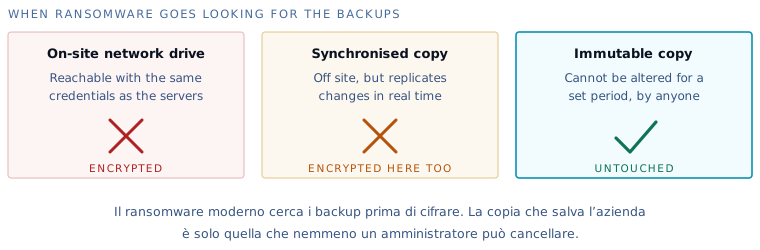
Against a fire or a broken disk it works perfectly well. Against ransomware it does not, and the reason is that all three copies are alterable: if the attacker reaches credentials with high privileges, they delete or encrypt all of them, and the synchronised off-site copy dutifully aligns itself with the encrypted version.
That is why one condition is now added: at least one copy must be unalterable for a set period, by anyone, administrators included. It is not a convenience feature you can switch off when it gets in the way: the fact that you cannot switch it off is precisely what makes it useful.
What “immutable” means in practice
When a copy is written, the system locks it for a period decided in advance — seven days, thirty, ninety. During that period no credential on earth can alter or delete it: not the company’s administrator, not our engineer, not whoever stole the passwords.
It is inconvenient by design, and that is the point. An attacker who gains complete control of your systems still finds a version of the data they cannot touch, and that version decides whether the company is back on its feet in a day or in three weeks.
The restore test: the only thing that proves it works
A backup that runs is not the same as a backup that saves you. Between the two sits a check that in most companies has never been carried out, and the discovery always arrives at the worst possible moment.
The three surprises we find most often when someone actually tries:
- the very thing that was needed is missing, because an important folder was excluded years ago by somebody who no longer works there;
- the files are there but the system that reads them is not: the database was saved and not the application that queries it, or the files and not the virtual machine;
- the restore works but takes three days, which is perfectly fine for a historical archive and not at all fine for the system the company runs on.
That is why periodic testing is part of the service and not an extra: a restore is genuinely carried out, timed, and the result written down. It is also the document that clients increasingly ask their suppliers to produce.
What needs saving, beyond the files
The list of what you need in order to start again is almost always longer than the list of what is being saved:
- whole virtual machines, not only the data inside them;
- mailboxes, including cloud ones — many assume the service provider acts as an archive, and it does not;
- equipment configurations: firewall, switches, phone system. Rebuilding those from memory is the slowest part of any recovery;
- the databases behind business systems, using the correct method: copying a database file while it is in use often produces an unusable copy;
- documents that live on one computer only, which exist in every company and appear in no inventory.
The rules we apply
- 3-2-1 — three copies, two types of media, one off site: the standard that ransomware does not forgive anyone for ignoring;
- Encryption before transfer — with your own key: data travels and rests unreadable to anyone but you;
- Multiple versions — to go back to before the mistake, or before the attack that sat silent for days;
- Scheduled restore tests — an untested backup is a hope; we test ours periodically and show you the result;
- Daily monitoring — every failed backup job raises an alert handled by an engineer, not an email nobody reads.
A concrete example
One client suffered a ransomware attack that came in through a supplier’s remote access: the servers were encrypted, and so were the local backups. The off-site XRB copy — isolated and versioned — was not. Restore started the same day, the company was operating again the next morning, and no ransom was paid. Since then, the question “how much does off-site backup cost?” has a very simple answer in that sector: less than one day of downtime.
Not only servers
XRB also protects what is often left uncovered: key workstations (accounts, the technical office), NAS devices, and Microsoft 365 data — mail, OneDrive and SharePoint, which Microsoft protects as a platform but not from your own deletions. Where exactly the boundary sits is something we define during the free assessment visit.